 5d9508b165
I noticed a bit of an annoying behavior with the quick format bar. Whenever I make a typo when writing a message I usually go back with a ctrl+shift+arrow selection to correct it, and that of course triggers the bar, but then there wasn't any obvious way to make it go away (other than pressing backspace or delete, [ChatBar.qml#L339](https://invent.kde.org/network/neochat/-/blob/master/src/chatbar/ChatBar.qml?ref_type=heads#L339)), so it'd always be stuck visible until I clicked somewhere with my mouse, which I found somewhat annoying.

This intends to fix that, by hiding it whenever the selection is cleared, which seems like a reasonable and expected behavior to me. I would also be okay with making it dismissable with escape, if this current suggestion has some unintended side-effect that I've missed.

I also think that this should in practice "solve" this bug https://bugs.kde.org/show_bug.cgi?id=511590 but I didn't link it directly as their suggested solution is smarter placement of the bar.


NeoChat
A Qt/QML based Matrix client.



Introduction
NeoChat is a client for Matrix, the decentralized communication protocol for instant messaging.
NeoChat is based on KDE frameworks and as libQuotient, a Qt-based SDK for the Matrix Protocol.
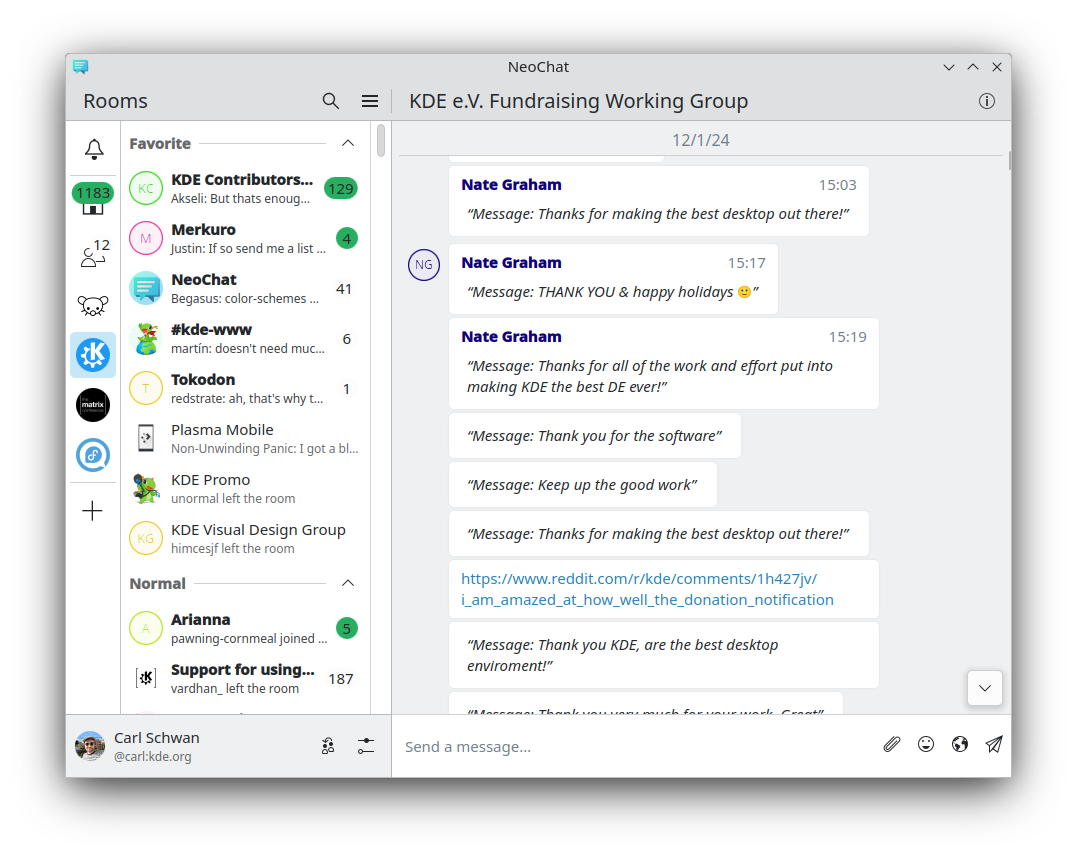
Features
NeoChat aims to be a fully featured application for the Matrix specification. As such most parts of the current specification are supported, with the notable exceptions of VoIP, threads, and some aspects of End-to-End Encryption. There are a few other smaller omissions due to the fact that the Matrix spec is constantly evolving, but the aim remains to provide eventual support for the entire spec.
Due to the nature of the Matrix specification development NeoChat also supports numerous unstable features. Currently these are:
- Polls - MSC3381
- Sticker Packs - MSC2545
- Location Events - MSC3488
Get it
Details where to find stable releases for NeoChat can be found on its homepage.
Nightly builds for Linux and Windows can be downloaded from cdn.kde.org. Nightly builds for Android are available from KDE's nightly F-Droid repository. Nightly Flatpaks are available from KDE's nightly Flatpak repository.
Building NeoChat
The best way to build KDE apps during development is to use kdesrc-build. The full instructions for this can be found on
the KDE community website's get involved section under development. This
is primarily aimed at Linux development.
For Windows and Android Craft is the primary choice. There are guides for setting up development environments for Windows and Android.
Running
Just start the executable in your preferred way - either from the build directory or from the installed location.
Tests
Tests are in the repository under autotests and appiumtests.
The project has CI setup to test new commits to the repository. All tests are expected to pass for a merge request to be complete.
Current build status

Currently the number of tests is limited, but growing. If anyone wants to help improve this, those contributions would be especially welcome.
Contributing
As is the case throughout the KDE ecosystem contributions are welcome from all. The code base is managed in the NeoChat repository of the KDE Gitlab instance.
Contact
The best place to reach the maintainers is on the KDE Matrix instance in the NeoChat channel, #neochat:kde.org. See Matrix for more details.
Acknowledgement
NeoChat utilizes libQuotient as its Matrix SDK.
NeoChat is a fork of Spectral.
License

This program is licensed under GNU General Public License, Version 3.